Doing the work
Projects, task lists, tasks, and subtasks
Which one do I use for this piece of work? When to make a project, a task list, a task or a subtask, with rules of thumb and examples.
sjTasks has four ways to organise work. Each answers a different question. Pick the smallest one that fits; you can always move things later.
| Use a… | When the work is… | Example |
|---|---|---|
| Project | a body of work with its own people, files, and reporting — usually a job for a client, a product, or an initiative that someone will ask "how is it going?" about. A project can belong to one client | Acme website redesign, Q4 marketing, Office move |
| Task list | a grouping inside a project that helps you read the project: a phase, a stream, a backlog | Phase 1 — Discovery, Design, Bugs, Backlog |
| Task | one thing that one person can own and finish | Write the homepage copy, Send the contract to Acme |
| Subtask | a piece of a task that needs its own owner, due date, or estimate — but only makes sense as part of the parent | Homepage copy → draft, Homepage copy → client review |
Task lists and subtasks start switched off. A new team has projects and tasks, which is all most teams need at first. An admin turns either on in Team settings → Features; until then the project page has no Add a task list and a task has no subtasks section. Turning one off later hides the control, never the work: lists and subtasks already made stay where they are.
The rules of thumb
If someone will ask "how's it going?", it's a project. A project has its own page, its own watchers, its own files, and shows 12 of 20 done — press it and you get the twelve. Any view can be filtered to it. Every team starts with one project called General for the things that don't belong anywhere in particular — quick to-dos land there automatically.
The project page shows each list's open work. Finished and canceled tasks stay out of the way: Show done at the top of the page brings them all back (and it is in the address, so a link keeps it), or the 4 done · show line on one list opens just that one. A long list comes fifty rows at a time with Show 50 more at its foot. The status, assignee, priority and due date on a row read as text; click one to change it, and the row says Saved. A task's tags sit on their own line under its title.
The same project can be read by status instead: the Board control at the top of the page lays every task out in five columns — Open, In progress, Blocked, On hold, Done — and dragging a card to another column changes its status. It answers where does everything stand? the way the list answers what is the plan?; The board has the details.
Blocked, or on hold?
Two of the six statuses mean "not moving", and they are not the same thing.
Blocked is waiting on something — a decision, a file, somebody else's task. Set it and the page asks what it is waiting on, and your answer becomes a note. Blocked work is still being chased: it goes late when its date passes, it appears in your daily email, and it is somebody's job to unstick it.
On hold is not now. You decided to stop, and there is nothing to chase. Work on hold is still unfinished, so it stays in the project's 12 of 20 done, in your open counts, and on the board where you can see it and drag it back. But it is never late, whatever its date says, and it never appears in the dated parts of your daily email — it gets its own quiet line there instead, so it is not forgotten either. Parking something is a decision, and a decision should not come back as a red chip every morning.
If you find yourself setting Blocked on something nobody is chasing, you mean On hold.
If it's just a way of grouping tasks you can already see, it's a task list. Task lists don't have owners, dates, or progress of their own; they're headings. "Phase 1 / Phase 2", "Design / Build / Launch", or "Now / Next / Later" are all good task lists. If you find yourself wanting a due date on a task list, it's probably a task — or a project.
Every project starts with one list, called Tasks. Add a task list on the project page makes another; each list can be renamed, moved up or down, and — by an admin — archived, which puts it away and moves its tasks back into the catch-all list. The picker beside quick add appears as soon as a project has more than one. Your first project walks through the controls.
If one person can own it and say "done", it's a task. A task has a priority, a due date, an
estimate, an owner, and a reference like acme-142 you can say out loud in a meeting. Most of
your work should be tasks. When in doubt, make a task.
If a piece of a task needs its own owner or date, it's a subtask. Subtasks are real tasks —
they have their own reference (acme-144), owner, due date, estimate, notes, and files —
that happen to live under a parent. Use them when a task has hand-offs: draft (you), review
(the client), publish (you again). The parent shows 1/3 progress; press it and only the finished
ones stay on screen, so the count says which one landed.
Everything a subtask carries is set from the parent's page. The Add a subtask box takes the
same line every add box takes — Draft the subject line @jane !high ~2h friday makes one with
an owner, a priority, an estimate and a date — and on each row the status, owner, priority,
date and estimate read as text until you click one, then the row says Saved. A subtask's
… menu is where you block the parent, open it, or promote it.
Subtasks go one level deep, on purpose. If a subtask needs subtasks of its own, the parent was really a task list or a project. Promote to a top-level task, in the subtask's … menu, makes it a task of the project in its own right: same number, same notes, same files, just no longer under anything. Move a task to another project and its subtasks go with it, each renumbered in the new project with the old reference still opening it; a subtask cannot be moved on its own, because it lives in its parent's project. On the subtask's own page the same thing is in Details, under Subtask of: click the parent's name to move the subtask under a different task, or choose Make this a top-level task. A subtask's page has no Subtasks panel, because a subtask cannot have subtasks.
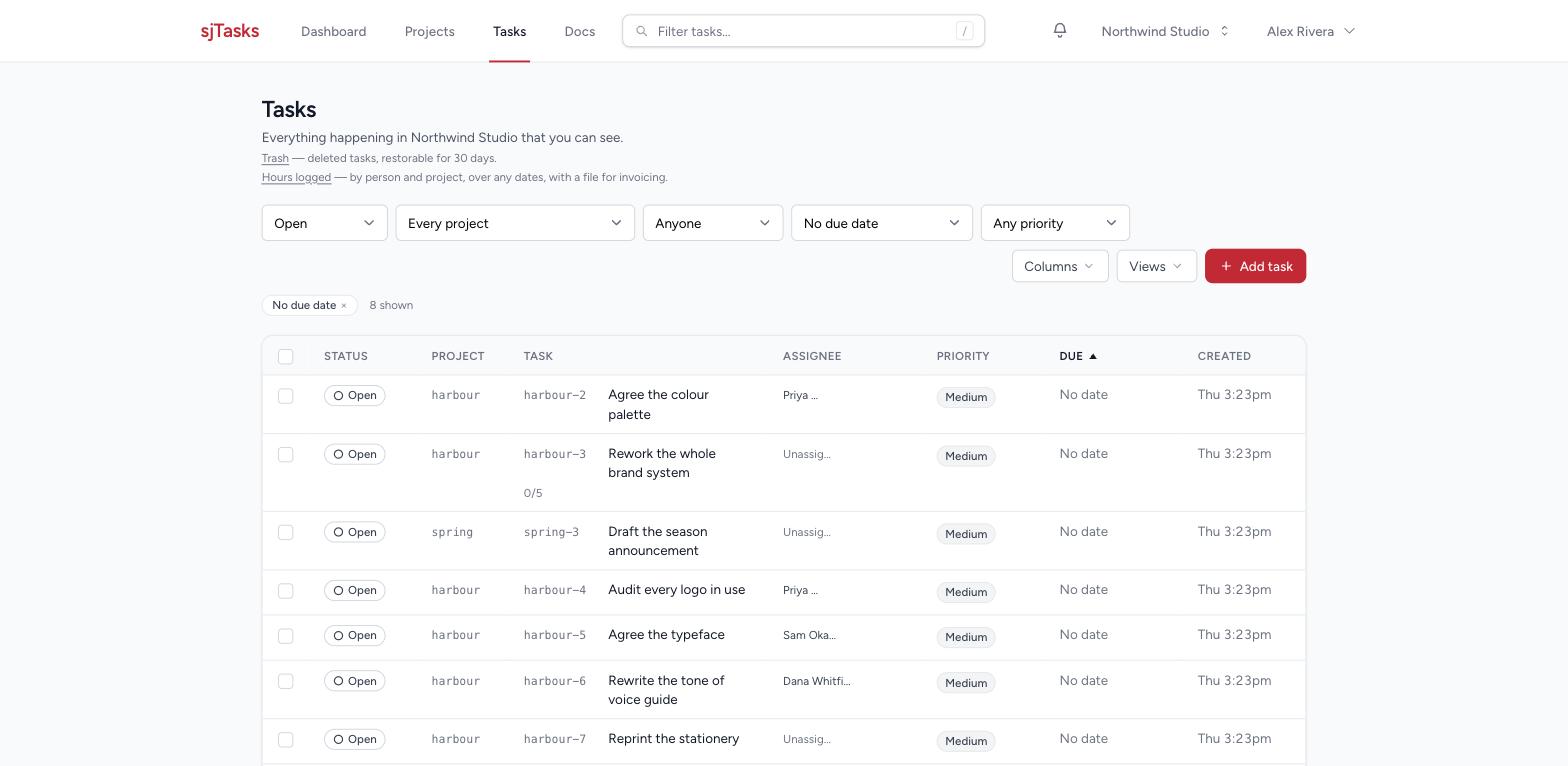
The sign that something has outgrown its shape is a due date nobody set — because nobody could say when "the whole thing" would land. Ask the Tasks table for open work with no due date and read the rows with a crowd of subtasks under them: those are the projects waiting to be named.
A subtask can block its parent. Choose Block the parent from the … menu beside a subtask (or tick it as you add one) when the parent truly can't be finished without it — the parent can't be marked done while that subtask is open, shows Blocked by acme-144, and the subtask wears a Blocks parent badge. Leave it off for nice-to-haves. Nothing else changes automatically: finishing every subtask doesn't finish the parent, and finishing the parent doesn't finish the subtasks. You decide.
A task can be waiting for an admin before it counts. On most teams this never happens. If an admin has switched Tasks need approval on for you, a task you raise opens with Waiting for Admin Approval under its title, and it stays out of every number — the project's 12 of 20 done, the board, the workload report, the overdue count, the digests — until an admin says yes. It is still yours, still on your list, still editable. Mark it Urgent and it goes through straight away. Approving is one click for an admin, and you get an email when it happens. Tasks that need approval has the whole of it.
A project on paper
Download PDF on a project page makes a summary to send or print: the brief, the counts in the header, every open task (under its task list, if the project has them), what was finished in the last 30 days, and this month's hours when your team tracks time and you can read its reports. It shows what you can see, and only you can download it. Saved views and the standard questions says how the PDFs work.
Things that trip people up
- Don't make a project per task. Projects are heavy on purpose — people, files, a page. If a "project" would have three tasks and be done in a week, it's a task list in an existing project, or three tasks in General.
- Don't nest to organise; filter instead. Priorities, assignees, and dates are what the Tasks table filters on. A deep tree is not an answer to a question.
- Moving is cheap. A task can move between lists and between projects. For another project, open the task and press Move to another project at the foot of the page, pick the project, and it goes — with its subtasks, under a new reference; the old one keeps finding it. A subtask travels with its parent and is not moved on its own. Start small.
- Canceled is the usual way work goes away. Work that won't happen gets canceled — it drops out of progress counts and stays in the record. Reach for that first: a canceled task is still searchable, still in the history, and still counts as a decision somebody made.
- Delete is for debris. A duplicate, a typo, a task somebody started in the wrong place. Admins see Delete this task at the foot of a task page and in a subtask row's "…" menu. So does the person who made the task — but only while it is still only theirs: the moment anyone else has left a note or a file on it, or any time has been logged, only an admin can delete it. Being assigned a task is not the same as having made it. Before the click, the page says exactly what goes with the task — its notes, its files, its logged hours — and that its subtasks move up rather than go. Nothing is destroyed by that click: the task waits 30 days in Trash (linked from the top of the Tasks page), where an admin puts it back with everything on it. While it is in the trash its hours are out of the Hours logged report. After 30 days it goes for good.
- Everything else is kept, not removed. A project that is finished gets archived, a person who leaves is deactivated rather than erased, and a team that ends is closed with your data handed back first.